T9 & Compact QWERTY
Layouts that put more than one letter on a key and let the prediction engine work out which one you meant: T9 in 316 languages and Compact QWERTY, with glide typing on both.
Most keyboards give every letter its own key. Twenty-six keys across a phone screen means each one is about a fingertip wide, and that’s the size everything else has to fit around.
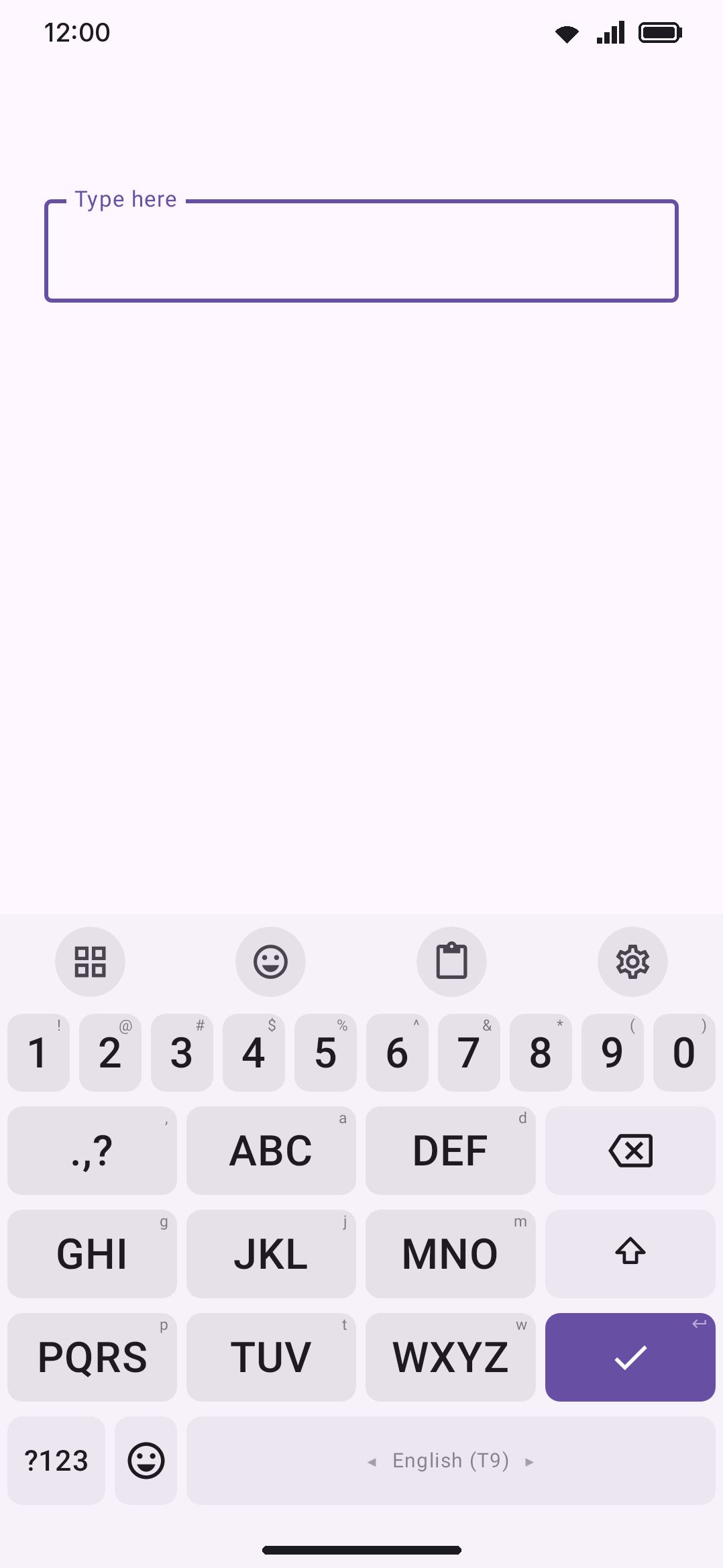
Two of the shipped layouts don’t do that. T9 puts the alphabet on eight keys, the way phone keypads did. Compact QWERTY keeps QWERTY’s exact letter order but pairs the keys up, five to a row instead of ten. Both give you keys two to four times the usual size, and both work out what you meant afterwards rather than asking you to be precise.
Neither one starts enabled. Turn them on under WM Keyboard Languages & layouts English, where they sit with English’s other layouts alongside Dvorak and Colemak. T9 also comes in 315 more languages, each listed under its own language: see T9 in other languages.
Why other keyboards can’t do this
Section titled “Why other keyboards can’t do this”This is the part worth explaining, because it’s not a matter of nobody having thought of it.
Almost every Android keyboard descends from AOSP’s, and its prediction engine assumes one keystroke is one letter. Type h, e, l, l, o and it looks up “hello”. That assumption is baked deep enough that a key carrying three letters has nothing sensible to hand it, which is why layouts like these vanished when phones got touchscreens. The keyboards that kept them, like Smart Keyboard Pro and Multiling O, wrote their own decoders.
WM Keyboard’s decoder walks the dictionary itself rather than the alphabet, so a keystroke doesn’t have to be a single letter. It can be a set of them, and every word the dictionary can spell from that run of sets comes back as a candidate. Press the keys for 4 6 6 3 and you get “good”, “gone”, “home”, “hood” and the rest, ranked by which one you’re most likely to have meant.
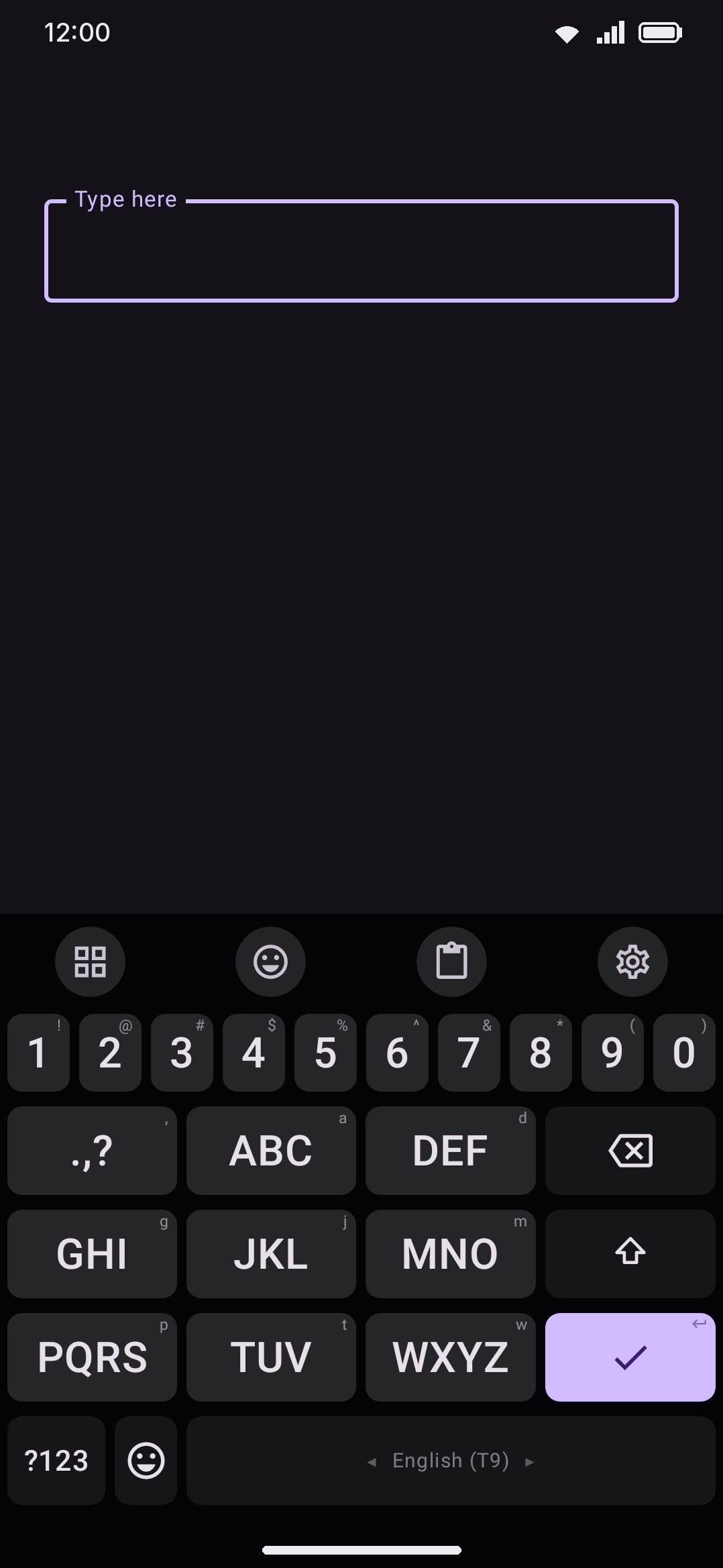
The grid is the keypad you already know. 2 is abc, 3 is def, and so on up to 9 for wxyz. The digit sits in each key’s corner, and holding a key types it.
1 is the punctuation key, same as it was on a phone. It types a full stop, and its long-press holds the comma, question mark, exclamation mark, apostrophe, hyphen, colon and semicolon.
Delete, shift and enter take a column of their own down the right, so the letter keys keep the full quarter of the screen each. The bottom row is ?123, the globe, and a double-width spacebar.
One key per letter group means you tap a word’s length and nothing more. “keyboard” is eight taps, the same eight taps as on any keyboard, but on keys four times the size.
Reading the word back
Section titled “Reading the word back”The text field shows the best reading as you type, not the raw keys. Tap the four keys of “home” and “home” is what appears (or “good”, if that’s the commoner word for those keys, in which case “home” is one tap away on the suggestion strip).
Space commits whatever is showing. There’s no confidence threshold here the way there is for autocorrect on a normal keyboard, because there’s nothing to be conservative about: the keys on their own aren’t a word, so committing “the reading” is the only answer that makes sense.
Words the dictionary doesn’t know
Section titled “Words the dictionary doesn’t know”Names, passwords, made-up words. Hold the key and its letters are in the popup, after the digit. Pick one and it goes in as itself: that position stops being a guess, and the rest of the word carries on being decoded normally. So you can spell the tricky part of a word by hand and let the keyboard handle the rest.
Anything you spell out this way gets learned like any other word, so you only have to do it a couple of times.
T9 in other languages
Section titled “T9 in other languages”The same keypad ships for 315 more languages, so switching language on the globe key keeps you on the keypad instead of dropping you back onto a full keyboard. Each one is under its own language in WM Keyboard Languages & layouts, called T9 with the language’s name after it, and like the English one it starts switched off.
The grid never changes: punctuation on 1, letters on 2 to 9, the same column down the right. Which letters each key carries, and in what order, comes from ETSI ES 202 130, the European standard phone makers followed for the 12-key keypad. It’s the layout you’ll remember if you texted on a Nokia or a Sony Ericsson in that language:
- Latin-script languages keep
abcon 2 throughwxyzon 9 and add their own letters to the key of the letter they’re built from: German putsäon 2 andßon 7, Polish putsłon 5, Czech putsřandšon 7. - Russian runs
абвгдеёжзийклмнопрстуфхцчшщъыьэюя, and Ukrainian, Belarusian and Bulgarian follow the same pattern with their own letters. - Serbian Cyrillic matches its keys to Serbian Latin, so
цandчare on 2 withа б, the waycandčsit witha b. - Greek runs
αβγtoχψω, with the accented vowels andςon their letter’s key. - Hebrew starts
דהוon 2 andאבגon 3, with the final forms beside their letter. - Arabic, Persian and Urdu each have their own table: Arabic starts
ب ت ة ثon 2 and puts every form of alef and hamza on 3. - Armenian fills 2 to 8 and keeps 9 for Armenian punctuation, and Georgian runs its alphabet in order across all eight.
Where the standard assigns a language another’s table, that’s the one you get: Catalan and Galician use the Spanish keypad, Faroese and Greenlandic the Danish one, Rusyn the Ukrainian one, Occitan, Breton and Walloon the French one.
Languages the standard doesn’t cover start from the table of the language their phones were sold in (Bavarian and Swiss German from German, Kurmanji Kurdish from Turkish, Talysh from Azerbaijani, Kazakh, Tatar and the other Cyrillic-script languages of Russia and Central Asia from Russian, Pashto and Sorani from Persian, Sindhi and Saraiki from Urdu), or from the plain keypad for languages whose phones were sold with the English one, such as Indonesian, Swahili, Zulu and the romanized Hindi, Bangla and Urdu. Their own letters then go on the key the standard’s language-independent table gives them, or on the key of the letter they’re read as: Hausa’s ɓ on 2, Ewe’s ɛ on 3, Kazakh’s қ on 4. Tifinagh has no keypad standard, so Tamazight and Tachelhit run the alphabet in order across the keys.
Scripts with no capital letters (Georgian, Hebrew, Tifinagh and the Arabic-script languages) have a comma in the shift key’s place in the right-hand column. The Arabic-script keypads use ، ؟ ؛ on 1, and Urdu, Sindhi, Saraiki and Punjabi add ۔.
Hindi, Bangla, Tamil and the other scripts of India
Section titled “Hindi, Bangla, Tamil and the other scripts of India”If you typed Hindi or Bangla on a keypad phone sold in India, this is that layout. The standard records it for Hindi, Bangla and Tamil, taken from the phones on the Indian market, and every other Indic keypad here follows the same plan:
| Key | Carries | Hindi |
|---|---|---|
| 1 | the signs: candrabindu, anusvara, visarga, virama | ँ ं ः ् |
| 2 | the a, i, u and ri vowels, with their vowel signs | अ आ इ ई उ ऊ ऋ and ा ि ी ु ू ृ |
| 3 | the e and o vowels, with their vowel signs | ए ऐ ओ औ and े ै ो ौ |
| 4 to 8 | one consonant row each | क-row, च-row, ट-row, त-row, प-row |
| 9 | the rest of the consonants | य र ल व श ष स ह |
A vowel and its sign share a key, so you press the same key for आ at the start of a word and ा after a consonant, and the dictionary knows which one the word needs. A conjunct is the virama on 1 between its consonants, as it was on the phone. Nukta letters such as क़ and ड़ sit with their consonant and take one press.
Because 1 holds the signs, the sentence’s punctuation moves to the key where the shift key would be: । on the Devanagari, Bangla, Gurmukhi and Odia keypads, ။ for Burmese, ។ for Khmer and . for the others, with the rest behind a hold.
That covers Hindi, Marathi, Nepali, Sanskrit and the other Devanagari languages, Bangla and Assamese, Punjabi, Gujarati, Odia, Tamil, Telugu, Kannada, Malayalam and Sinhala. Santali’s Ol Chiki and Sylheti’s Syloti Nagri follow the same plan, and so do Burmese and Khmer, with the signs on 1, the vowels on 2 and 3, and the consonant rows after them.
Thai, Lao and Vietnamese
Section titled “Thai, Lao and Vietnamese”Thai uses the Thai phone keypad: consonants in alphabet order across 2 to 7, vowels and tone marks written above or below the line on 8, and vowels written before or after it on 9. Lao is laid out the same way.
Vietnamese uses the standard’s table (ă and â on 2 with a, ơ and ô on 6) and puts every toned vowel on its vowel’s key. Press the keys for the plain letters and the dictionary supplies the tones, the way predictive Vietnamese worked on a phone.
Tone marks and other combining marks
Section titled “Tone marks and other combining marks”Some languages write marks that have no single-character form: Yoruba’s ẹ́, Guarani’s g̃, Dinka’s ɛ̈, Tyap’s a̱. Each mark is a keypress of its own, after its letter, on a fixed key: acute on 2, grave on 3, hook on 4, tilde on 5, dot below on 6 (Vietnamese’s tone keys in Traditional T9), and diaeresis on 8.
Arabic-script keypads put the harakat (tanwin, shadda and the short vowels) on 3 with the alef forms. Yiddish uses the standard’s table, where a pointed letter such as אַ is one press. Cherokee’s syllabary runs across the eight keys a consonant row or two at a time.
Every letter a key carries is in its long-press popup too, so the rule from Words the dictionary doesn’t know still holds: hold the key, pick the letter, and that position is spelled exactly.
The decoding runs on the language’s word list, so the keypad needs that list on the device: adding a language offers to download it, and Downloadable dictionaries covers getting it later.
Compact QWERTY
Section titled “Compact QWERTY”Same idea, gentler. The rows are QWERTY’s own, folded two letters to a key:
| Row | Keys |
|---|---|
| Top | qw er ty ui op |
| Home | as df gh jk l |
| Bottom | zx cv bn m |
l and m end their rows on their own, because nine and seven are odd numbers.
Every letter is still where your thumb expects it, so there’s nothing to relearn. Two letters per key is much less ambiguity than three or four, which means the decode is closer to certain and the suggestion strip has less work to do. Shift and delete flank the bottom row at half width, which on this grid is the width of an ordinary QWERTY key.
The digits keep their QWERTY positions in the long-press alternates, so 1 and 2 are both behind the qw key and they still read left to right across the top row.
Glide typing
Section titled “Glide typing”Both layouts glide, and this is the part that surprises people, because it’s rare enough that plenty of long-time T9 users have never seen it work.
It falls out of how glide already worked here. The decoder has always matched a stroke against keys rather than letters, because plenty of layouts put more than one character on a key already. Probhat, the Bengali layout, has ক and খ on the same key, and refusing the second one would make most aspirated Bengali words impossible to swipe. So a T9 key carrying abc is the same situation with more letters, and the existing decoder handles it without changes.
Draw through the keys of a word and the candidates come back, ordered by the language model the same way tapped words are. On T9 a stroke is ambiguous (the same path spells “good”, “gone” and “home”), so the strip earns its keep. The glide ambiguity picker helps here too: when two readings are close, it holds the word until you lift so you can choose.
Double letters have the old keypad problem, since a finger can’t visit a key twice without leaving it. The decoder allows for it, the way it does on a normal layout.
What to expect
Section titled “What to expect”Straight talk about the trade:
- Common words come easily. “the”, “and”, “have”, “there” come out of the top slot without a thought.
- The strip matters more. On QWERTY you can ignore it for whole sentences. Here it’s part of typing, especially on T9, where words like “home” and “good” share every key.
- Rare words take a moment. Anything the dictionary hasn’t got needs the long-press spelling, once.
- Typo correction still runs, quietly. Hitting the key next door is still caught, but it’s held to a much higher bar than usual: a reading that uses your keystrokes exactly as you pressed them beats one that assumes you slipped, unless the evidence is overwhelming.
The personal dictionary does most of the heavy lifting over time. The more the keyboard knows about how you write, the less ambiguous your keys become.
Building your own
Section titled “Building your own”This isn’t limited to the two shipped layouts. Any layout can put a set of letters on a key, in the layout editor: tap the key, and Letters this key stands for is under Output. Type qw and that key stands for both.
Two things happen when you do, and they’re the two things that are easy to miss if you build one of these by hand:
- Output becomes the first letter of the set, and stops being editable. That isn’t fussiness. A tap has to commit something, and the decoder tracks what you pressed as one character per keystroke with the key’s set carried alongside; an output from outside the set would make those two describe different typing. The editor writes it for you so it can’t drift.
- The letters are offered to the long-press popup, with a button that puts them there. Take it. Without the letters in the popup there is no way at all to spell a word the dictionary doesn’t know, and that’s not something you notice while testing “the” and “and”.
Keys with one letter need nothing: leave the field blank. A mixed grid is normal, and it’s what Compact QWERTY is, with L and M alone on their keys.
Everything else follows on its own. The decoder reads the key sets, glide picks up the letters at that key’s centre, and typo proximity works out neighbours between keys instead of between letters.
The field is letters in the raw JSON if you’d rather write a whole board at once:
{ "label": "ABC", "output": "a", "letters": "abc", "longPress": ["2", "a", "b", "c"] }A file that gets the anchor wrong is repaired on import rather than accepted quietly, and the confirm dialog says what changed.
Four keys, three keys, letters grouped however you like.